给home 做软连接出现问题

问题现象

1
2
需求: home 目录需要做软链接,把 /home 进行重命名失败
现象如下图:

查找原因

1
2
3
4
5
lsof +d /home   #查看是哪个进程占用该目录

kill -9 pid #把该进程停掉

grep -h home /proc/*/task/*/mountinfo | sort -u

解决方法

1
2
service NetworkManager stop

阅读全文 »

zabbix和服务器相关配置

监控脚本

1
2
3
4
5
6
7
8
9
10
11
12
13
14
15
16
17
18
19
20
21
22
23
24
25
26
27
28
29
30
31
32
33
34
35
36
37
38
39
40
41
[root@localhost zabbix]# cat /etc/zabbix/scripts/ip_check.sh
#!/bin/bash
# function:monitor tcp connect status from zabbix


web_ip_discovery () {
WEB_IP=($(cat /etc/zabbix/scripts/ip_list.txt | grep -v "^#"))
printf '{\n'
printf '\t"data":[\n'
for((i=0;i<${#WEB_IP[@]};++i))
{
num=$(echo $((${#WEB_IP[@]}-1)))
if [ "$i" != ${num} ];
then
printf "\t\t{ \n"
printf "\t\t\t\"{#SITENAME}\":\"${WEB_IP[$i]}\"},\n"
else
printf "\t\t{ \n"
printf "\t\t\t\"{#SITENAME}\":\"${WEB_IP[$num]}\"}]}\n"
fi
}
}

web_site_code () {
ip=`echo $1|awk -F ':' '{print $1}'`
#echo $ip
/usr/sbin/fping ${ip} 2> /dev/null |grep -c 'alive'
}

case "$1" in
web_ip_discovery)
web_ip_discovery
;;
web_site_code)
web_site_code $2
;;
*)

echo "Usage:$0 {web_ip_discovery|web_site_code [URL]}"
;;
esac

zabbix conf配置

1
2
3
cat /etc/zabbix/zabbix_agentd.d/ip_check.conf
UserParameter=web.ip.discovery,/etc/zabbix/scripts/ip_check.sh web_ip_discovery
UserParameter=web.ip.code[*],/etc/zabbix/scripts/ip_check.sh web_site_code $1

zabbix 存储IP文件

1
2
3
[root@localhost zabbix]# cat /etc/zabbix/scripts/ip_list.txt          
10.144.24.1:6_gateway
10.144.24.2:9_route

zabbix 自动发现模板(导入模板并关联主机)

1
2
3
4
5
6
7
8
9
10
11
12
13
14
15
16
17
18
19
20
21
22
23
24
25
26
27
28
29
30
31
32
33
34
35
36
37
38
39
40
41
42
43
44
45
46
47
48
49
50
51
52
53
54
55
56
57
58
59
60
61
62
63
64
65
66
67
<?xml version="1.0" encoding="UTF-8"?>
<zabbix_export>
<version>5.0</version>
<date>2021-08-18T08:15:04Z</date>
<groups>
<group>
<name>Ping</name>
</group>
</groups>
<templates>
<template>
<template>Template ICMP Ping</template>
<name>Template ICMP Ping</name>
<groups>
<group>
<name>Ping</name>
</group>
</groups>
<applications>
<application>
<name>IP_PING</name>
</application>
</applications>
<discovery_rules>
<discovery_rule>
<name>web.ip.discovery</name>
<key>web.ip.discovery</key>
<delay>30s</delay>
<lifetime>0</lifetime>
<item_prototypes>
<item_prototype>
<name>IP Code ON $1 Alive</name>
<key>web.ip.code[{#SITENAME},]</key>
<applications>
<application>
<name>IP_PING</name>
</application>
</applications>
<trigger_prototypes>
<trigger_prototype>
<expression>{max(#3)}&lt;&gt;1</expression>
<name>IP {#SITENAME} host is not alive</name>
<priority>HIGH</priority>
</trigger_prototype>
</trigger_prototypes>
</item_prototype>
</item_prototypes>
<graph_prototypes>
<graph_prototype>
<name>IP PING</name>
<graph_items>
<graph_item>
<sortorder>1</sortorder>
<color>1A7C11</color>
<item>
<host>Template ICMP Ping</host>
<key>web.ip.code[{#SITENAME},]</key>
</item>
</graph_item>
</graph_items>
</graph_prototype>
</graph_prototypes>
</discovery_rule>
</discovery_rules>
</template>
</templates>
</zabbix_export>

告警相关配置

阅读全文 »

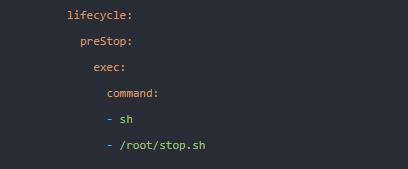
通过Prestop参数调用

1
定义一个优雅关闭的脚本,通过 k8s-prestop 在关闭 POD 前调用优雅关闭脚本,实现 pod 优雅关闭。

shell脚本修改为exec执行

1
shell 中添加一个 exec 即可让应用进程替代当前 shell 进程,可将 SIGTERM 信号传递到业务层,让业务实现优雅关闭

通过init工具启动

1
2
使用 dump-init 或 tini 做为容器的主进程,在收到退出信号的时候,会将退出信号转发给进程组所有进程。,主要适用应用本身无关闭信号处理的场景。docker –init 本身也是集成的 tini
使用 tini 或 dump-init 做为应用启动的主进程。tini 和 dumb-init 会将关闭信号向子进程传递,但不会等待子进程完全退出后自己在退出。而是传递完后直接就退出了。
阅读全文 »

docker 参数详解

1
2
3
4
5
6
7
8
9
10
11
12
13
14
15
16
17
18
19
20
21
22
23
24
25
26
27
28
29
30
31
32
33
34
35
36
37
38
39
40
41
42
43
44
45
46
47
48
49
50
51
52
53
54
55
56
57
58
59
60
61
62
63
docker-daemon.json各配置详解
{
“api-cors-header”:"", ——————在引擎API中设置CORS标头
“authorization-plugins”:[], ——————要加载的授权插件
“bridge”:"", ————将容器附加到网桥
“cgroup-parent”:"", ——————为所有容器设置父cgroup
“cluster-store”:"", ——————分布式存储后端的URL
“cluster-store-opts”:{}, ————————设置集群存储选项(默认map [])
“cluster-advertise”:"", ————————要通告的地址或接口名称
“debug”: true, ————————启用调试模式,启用后,可以看到很多的启动信息。默认false
“default-gateway”:"", ——————容器默认网关IPv4地址
“default-gateway-v6”:"", ——————容器默认网关IPv6地址
“default-runtime”:“runc”, ————————容器的默认OCI运行时(默认为“ runc”)
“default-ulimits”:{}, ——————容器的默认ulimit(默认[])
“dns”: [“192.168.1.1”], ——————设定容器DNS的地址,在容器的 /etc/resolv.conf文件中可查看。
“dns-opts”: [], ————————容器 /etc/resolv.conf 文件,其他设置
“dns-search”: [], ————————设定容器的搜索域,当设定搜索域为 .example.com 时,在搜索一个名为 host 的 主机时,DNS不仅搜索host,还会搜
索host.example.com 。 注意:如果不设置, Docker 会默认用主机上的 /etc/resolv.conf 来配置容器。
“exec-opts”: [], ————————运行时执行选项
“exec-root”:"", ————————执行状态文件的根目录(默认为’/var/run/docker‘)
“fixed-cidr”:"", ————————固定IP的IPv4子网
“fixed-cidr-v6”:"", ————————固定IP的IPv6子网
“data-root”:"/var/lib/docker", ————-Docker运行时使用的根路径,默认/var/lib/docker
“group”: “”, ——————UNIX套接字的组(默认为“docker”)
“hosts”: [], ——————设置容器hosts
“icc”: false, ——————启用容器间通信(默认为true)
“ip”:“0.0.0.0”, ————————绑定容器端口时的默认IP(默认0.0.0.0)
“iptables”: false, ———————启用iptables规则添加(默认为true)
“ipv6”: false, ——————启用IPv6网络
“ip-forward”: false, ————————默认true, 启用 net.ipv4.ip_forward ,进入容器后使用 sysctl -a | grepnet.ipv4.ip_forward 查看
“ip-masq”:false, ——————启用IP伪装(默认为true)
“labels”:[“nodeName=node-121”], ————————docker主机的标签,很实用的功能,例如定义:–label nodeName=host-121
“live-restore”: true, ——————在容器仍在运行时启用docker的实时还原
“log-driver”:"", ——————容器日志的默认驱动程序(默认为“ json-file”)
“log-level”:"", ——————设置日志记录级别(“调试”,“信息”,“警告”,“错误”,“致命”)(默认为“信息”)
“max-concurrent-downloads”:3, ——————设置每个请求的最大并发下载量(默认为3)
“max-concurrent-uploads”:5, ——————设置每次推送的最大同时上传数(默认为5)
“mtu”: 0, ——————设置容器网络MTU
“oom-score-adjust”:-500, ——————设置守护程序的oom_score_adj(默认值为-500)
“pidfile”: “”, ——————Docker守护进程的PID文件
“raw-logs”: false, ——————全时间戳机制
“selinux-enabled”: false, ——————默认 false,启用selinux支持
“storage-driver”:"", ——————要使用的存储驱动程序
“swarm-default-advertise-addr”:"", ——————设置默认地址或群集广告地址的接口
“tls”: true, ————————默认 false, 启动TLS认证开关
“tlscacert”: “”, ——————默认 ~/.docker/ca.pem,通过CA认证过的的certificate文件路径
“tlscert”: “”, ————————默认 ~/.docker/cert.pem ,TLS的certificate文件路径
“tlskey”: “”, ————————默认~/.docker/key.pem,TLS的key文件路径
“tlsverify”: true, ————————默认false,使用TLS并做后台进程与客户端通讯的验证
“userland-proxy”:false, ——————使用userland代理进行环回流量(默认为true)
“userns-remap”:"", ————————用户名称空间的用户/组设置
“bip”:“192.168.88.0/22”, ——————————指定网桥IP
“registry-mirrors”: [“https://192.498.89.232:89”], ————————设置镜像加速
“insecure-registries”: [“120.123.122.123:12312”], ———————设置私有仓库地址可以设为http
“storage-opts”: [
“overlay2.override_kernel_check=true”,
“overlay2.size=15G”
], ————————存储驱动程序选项
“log-opts”: {
“max-file”: “3”,
“max-size”: “10m”,
}, ————————容器默认日志驱动程序选项
“iptables”: false ————————启用iptables规则添加(默认为true)
阅读全文 »

故障现象

故障现象

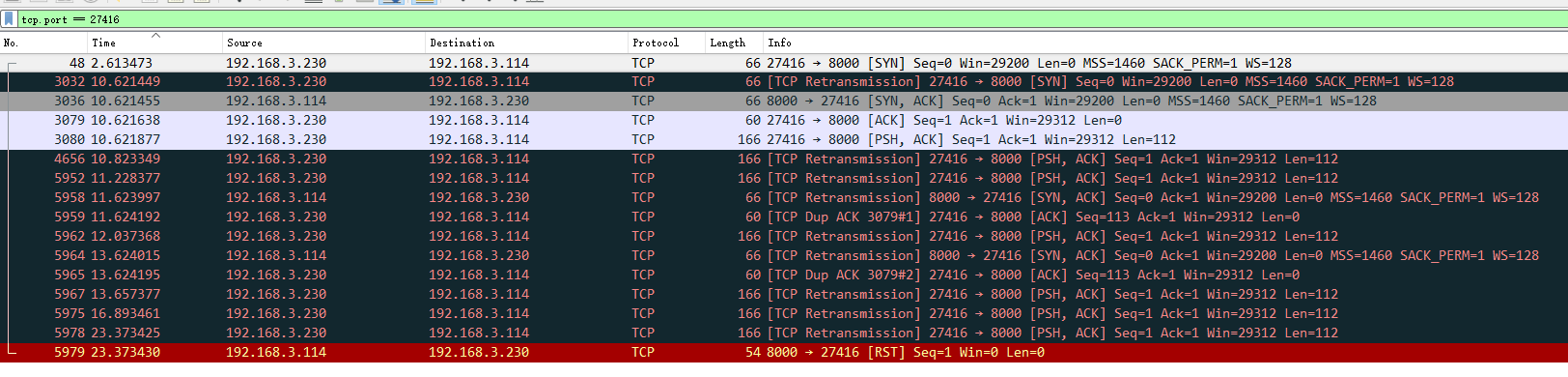
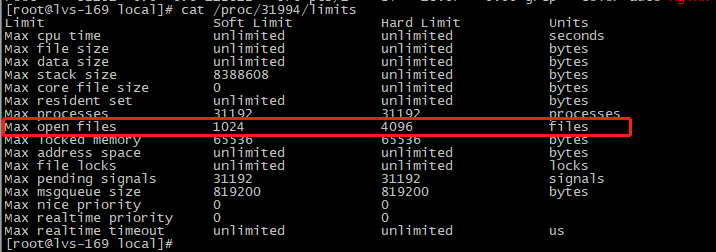
c++开发终端服务 进行并发压测,抓包报如下错误:

处理过程

修改 c++ 终端服务 systemd 启动脚本,添加如下两行:

1
2
DefaultLimitNOFILE=10240000 # 修改文件句柄的限制
DefaultLimitNPROC=10240000 # 修改进程树的限制

重启服务

1
2
systemctl daemon-reload 
systemctl restart edxxxx-xxp

systemctl show edxxxx-xxp | grep -i limit

重新压测正常

阅读全文 »

系统环境

1
2
操作系统: centos 7.9
nginx version: nginx/1.20.1

nginx install

1
2
yum -y install nginx
systemctl start nginx && systemctl enable nginx

nginx 安装stream模块

nginx stream 描述

1
Nginx 的 TCP/UDP 负载均衡是应用 Stream 代理模块(ngx_stream_proxy_module)和 Stream 上游模块(ngx_stream_upstream_module)实现的。Nginx 的 TCP 负载均衡与 LVS 都是四层负载均衡的应用,所不同的是,LVS 是被置于 Linux 内核中的,而 Nginx 是运行于用户层的,基于 Nginx 的 TCP 负载可以实现更灵活的用户访问管理和控制。

安装nginx stream

1
2
3
4
5
6
7
8
9
10
11
12
13
14
15
16
17
18
19
20
21
22
23
24
25
26
27
28
29
30
yum -y install nginx-mod-stream

stream {

log_format proxy '$remote_addr [$time_local] '
'$protocol $status $bytes_sent $bytes_received '
'$session_time "$upstream_addr" '
'"$upstream_bytes_sent" "$upstream_bytes_received" "$upstream_connect_time"';

access_log /var/log/nginx/tcp-access.log proxy ;

upstream tcp_9093 {
server 192.168.3.105:8000;
server 192.168.3.114:8000;
}

server {
listen 9093;
proxy_pass tcp_9093;
allow 192.168.7.0/24;
deny all;
}

server {
listen 9095;
proxy_pass 192.168.7.219:9098;
allow 192.168.7.0/24;
deny all;
}
}
阅读全文 »

zabbix 监控ssl证书

1.编写获取域名和443端口脚本

1
2
3
4
5
6
7
8
9
10
11
12
13
14
15
16
17
18
19
20
21
22
23
cat /etc/zabbix/scripts/ssl_discovery.py    
#!/usr/bin/env python
#coding:utf-8

import os
import sys
import json

#这个函数主要是构造出一个特定格式的字典,用于zabbix
def ssl_cert_discovery():
web_list=[]
web_dict={"data":None}
with open("/etc/zabbix/scripts/ssl_cert_list","r") as f:
for sslcert in f:
dict={}
dict["{#DOMAINNAME}"]=sslcert.strip().split()[0]
dict["{#PORT}"]=sslcert.strip().split()[1]
web_list.append(dict)
web_dict["data"]=web_list
jsonStr = json.dumps(web_dict,indent=4)
return jsonStr
if __name__ == "__main__":
print ssl_cert_discovery()

2.检查证书过期时间

1
2
3
4
5
6
7
8
9
10
11
12
13
14
15
16
17
18
19
20
cat /etc/zabbix/scripts/check-ssl-expire.sh
#!/bin/bash
host=$1
port=$2
end_date=`/usr/bin/openssl s_client -servername $host -host $host -port $port -showcerts </dev/null 2>/dev/null |
sed -n '/BEGIN CERTIFICATE/,/END CERT/p' |
/usr/bin/openssl x509 -text 2>/dev/null |
sed -n 's/ *Not After : *//p'`
# openssl 检验和验证SSL证书。
# -servername $host 因一台主机存在多个证书,利用SNI特性检查
# </dev/null 定向标准输入,防止交互式程序。从/dev/null 读时,直接读出0 。
# sed -n 和p 一起使用,仅显示匹配到的部分。 //,// 区间匹配。
# openssl x509 -text 解码证书信息,包含证书的有效期。

if [ -n "$end_date" ]
then
end_date_seconds=`date '+%s' --date "$end_date"`
now_seconds=`date '+%s'`
echo "($end_date_seconds-$now_seconds)/24/3600" | bc
fi

3.域名和端口存放文件

1
2
3
cat /etc/zabbix/scripts/ssl_cert_list
test.xxxxxx.com 443
test1.xxxxxx.com 443

配置zabbix

1
2
3
4
把脚本上传:/etc/zabbix/scripts/下
cat /etc/zabbix/zabbix_agentd.d/sslcert.conf
UserParameter=sslcert_discovery,/usr/bin/python /etc/zabbix/scripts/ssl_discovery.py
UserParameter=sslcert.info[*],/bin/bash /etc/zabbix/scripts/check-ssl-expire.sh $1 $2
1
2
3
4
5
重启agent和proxy
systemctl restart zabbix-agent
systemctl restart zabbix-proxy
测试
/etc/zabbix/scripts/check-ssl-expire.sh api.xxxxxx.com 443
阅读全文 »